

Description
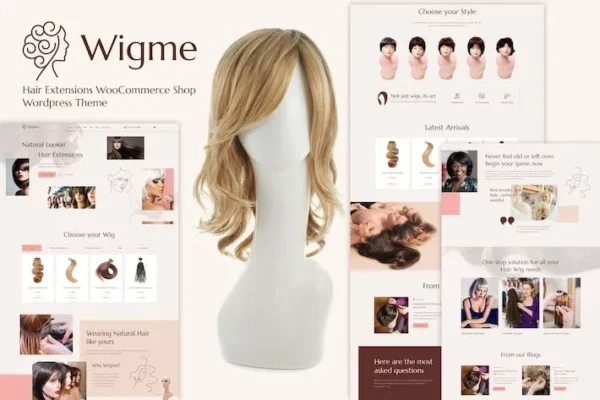
Wigme Hair Extensions WooCommerce Shop is a premium WordPress theme designed for beauty brands, salons, and wig retailers. With its elegant layouts, this WooCommerce beauty shop solution makes it easy to showcase hair extensions, wigs, and related products. The theme supports advanced filtering, responsive design, and SEO-friendly structures, ensuring your hair products eCommerce store ranks higher in search results. Whether you’re building a wig store online or a beauty salon WooCommerce theme, Wigme provides the perfect storefront to attract customers and boost conversions.
🎯 Purpose & Audience
- Purpose: Provide a complete WooCommerce-powered shop solution for hair extensions and beauty products.
- Audience: Hair extension retailers, wig shops, beauty brands, and salons seeking a stylish, conversion-focused online store.
🛍️ Key Features
- Modern Storefront Design: Elegant layouts tailored for beauty and fashion products.
- Product Showcase: High-quality image galleries, zoom features, and detailed product descriptions.
- WooCommerce Integration: Full support for product variations, stock management, and secure checkout.
- Customizable Pages: Flexible product, category, and landing pages to match brand identity.
- Responsive Design: Mobile-friendly layouts for smooth shopping across devices.
- Advanced Filtering: Customers can sort by length, color, texture, or price.
- Marketing Tools: Compatible with coupons, discounts, and upsell features.
- SEO-Friendly: Optimized structure for better search engine visibility.
- Easy Management: Intuitive dashboard for product uploads, inventory, and order tracking.
⚙️ Installation & Setup
- Install & Activate: Add Wigme to your WordPress site.
- Add Products: Upload hair extensions, wigs, or beauty items with images and details.
- Customize Storefront: Adjust layouts, colors, and branding to fit your business.
- Enable Payments: Connect WooCommerce with gateways like PayPal, Stripe, or Instamojo.
- Launch Shop: Customers browse, filter, and purchase products seamlessly.
📊 Comparison Snapshot
| Feature | Wigme WooCommerce Shop | Generic WooCommerce Theme |
|---|---|---|
| Target Audience | Hair/Beauty businesses | General e-commerce |
| Product Filtering | Length, color, texture | Basic categories only |
| Storefront Design | Beauty-focused layouts | Standard layouts |
| SEO Optimization | Built-in, tailored | Requires plugins |
| Marketing Tools | Coupons, upsells | Limited without add-ons |
⚠️ Risks & Considerations
- Niche Focus: Best suited for beauty/hair businesses; less flexible for unrelated industries.
- Customization Needs: While layouts are elegant, advanced branding may require CSS/Elementor tweaks.
- Plugin Compatibility: Ensure other WooCommerce extensions (subscriptions, memberships) are tested with Wigme.
✅ Why Choose Wigme?
- Professional branding: Tailored for beauty and fashion.
- Conversion-focused: Advanced filtering and product showcase boost sales.
- Scalable: Works for small salons to large online retailers.
- SEO-ready: Helps rank your store in Google faster.
👉 In short, Wigme – Hair Extensions WooCommerce Shop is a complete, stylish, and optimized solution for selling hair extensions and beauty products online. It’s ideal if you want a ready-made storefront that looks professional, drives conversions, and is easy to manage.









Reviews
There are no reviews yet.