
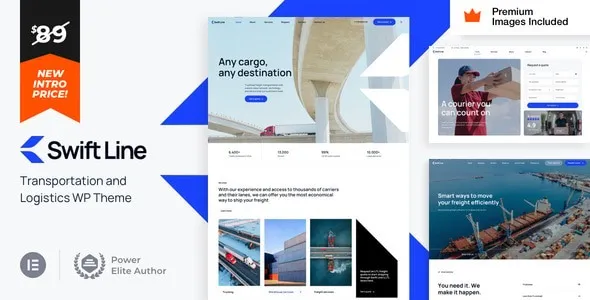

Description
SwiftLine – Transportation Logistics WordPress Theme is a modern, responsive, and industry‑focused WordPress theme designed for logistics companies, freight services, transport agencies, warehouses, and supply chain businesses. With professional layouts, WooCommerce integration, and Elementor customization, SwiftLine makes it easy to showcase services, manage bookings, and build a trustworthy online presence that drives growth in the transportation sector.
🚚 Key Features
- Logistics & Transport‑Focused Design
Purpose‑built layouts tailored for logistics firms, freight services, and supply chain businesses. - Service Showcase
Highlight shipping solutions, delivery options, and logistics packages with elegant templates. - WooCommerce Integration
Sell logistics services, transport packages, or related products with a seamless cart and checkout system. - Elementor Page Builder
Drag‑and‑drop customization with Elementor for effortless design without coding. - Responsive & Mobile‑Friendly
Optimized for desktops, tablets, and smartphones, ensuring smooth browsing experiences everywhere. - One‑Click Demo Import
Quickly replicate demo designs and launch your logistics website in minutes. - Advanced Customization
Unlimited color schemes, flexible typography, and multiple header/footer styles to match your brand identity. - Team & Staff Profiles
Present drivers, logistics managers, and staff with professional layouts. - Tracking & Booking Options
Integrate shipment tracking, booking forms, and customer inquiry systems. - Blog & Content Options
Share logistics updates, transport industry news, and company insights with customizable blog layouts. - SEO‑Friendly Structure
Clean code and optimized design to boost search engine visibility.
⚙️ Technical Highlights
- Compatible with WordPress 6+
- Built with Elementor for advanced customization
- WooCommerce‑ready for eCommerce functionality
- Retina‑ready and translation‑ready
- Lightweight and fast‑loading performance
- Includes documentation and regular updates
🎯 Why Choose SwiftLine?
SwiftLine is perfect for logistics companies, transport agencies, freight services, and supply chain businesses who want a professional, customizable, and industry‑specific WordPress theme. Its transport‑focused layouts, WooCommerce integration, Elementor customization, and responsive design make it a complete solution for building websites that inspire trust, streamline services, and grow your logistics brand.









Reviews
There are no reviews yet.