

Description
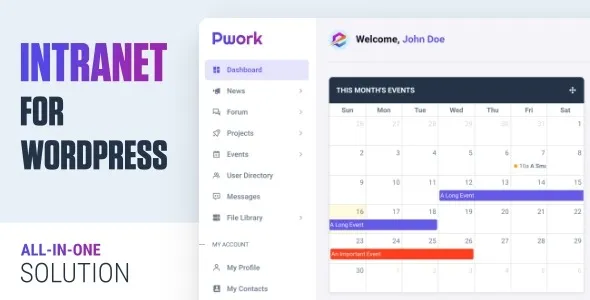
Pwork – Intranet for WordPress is an all‑in‑one plugin that transforms any WordPress site into a secure, private employee portal. It centralizes communication, collaboration, and knowledge sharing with modules for dashboards, forums, project management, messaging, and more, making it a complete intranet solution for businesses of all sizes.
🌐 Overview
- Purpose: Build a private, secure intranet inside WordPress.
- Audience: Companies, agencies, and organizations needing internal communication and collaboration tools.
- Integration: Works with any WordPress theme, no coding required.
🔑 Key Features
- Employee Dashboard: Personalized workspace with drag‑and‑drop widgets.
- News & Announcements: Centralized feed for company updates.
- Knowledge Base: Store and organize internal documentation.
- Discussion Forum: Tagging, search, and threaded discussions for team collaboration.
- Project Management: Kanban boards, task tracking, and progress monitoring.
- Events Calendar: Schedule and share company events.
- Private Messaging: Direct communication with live notifications.
- File Library: Secure file sharing and document storage.
- User Directory & Profiles: Manage employee information and roles.
- AJAX Live Updates: Real‑time content refresh for a smooth user experience.
⚙️ How It Works
- Install & Activate: Add Pwork to your WordPress site.
- Configure Modules: Enable dashboards, forums, projects, and messaging.
- Customize Layout: Use Bootstrap 5 and drag‑and‑drop widgets.
- Assign Roles: Control access with role‑based permissions.
- Launch: Employees log in to a secure portal for communication and collaboration.
📊 Comparison Table
| Feature | Default WordPress | Pwork – Intranet |
|---|---|---|
| Employee Dashboard | No | Yes |
| Project Management | No | Yes (Kanban) |
| Discussion Forum | Limited | Full |
| File Sharing | Basic | Secure Library |
| Private Messaging | No | Yes |
| Events Calendar | Limited | Advanced |
⚠️ Considerations
- Security: Designed for private, internal use; ensure proper hosting and SSL setup.
- Learning Curve: Multiple modules may require onboarding for employees.
- Performance: Best suited for small to medium-sized businesses; large enterprises may need to scale.
✅ Best For
- Agencies need centralized project and client communication.
- SMBs want a cost‑effective intranet solution.
- Organizations managing internal knowledge bases and events.
- Teams requiring secure messaging and collaboration tools.
In short, Pwork – Intranet for WordPress is a modular, theme‑agnostic solution that consolidates communication, project management, and knowledge sharing into one secure employee portal, helping teams stay connected, organized, and productive.









Reviews
There are no reviews yet.