Description
Wandau – Art & History Museum WordPress Theme is a sophisticated, elegant, and fully responsive WordPress theme designed for art galleries, history museums, cultural institutions, exhibitions, and creative studios. With its refined layouts and heritage-focused features, Wandau helps organizations showcase collections, promote events, and engage visitors with a professional digital presence.
🖼️ Key Features
- Museum & Gallery-Oriented Design
Tailored layouts for art museums, history exhibitions, cultural centers, and creative institutions.
- Collection & Exhibition Showcases
Highlight artworks, historical artifacts, and special exhibitions with customizable gallery templates.
- Event & Program Management
Could you promote upcoming exhibitions, cultural programs, and museum events with dedicated event layouts?
- Ticketing & Booking System
Integrated WooCommerce functionality allows visitors to purchase tickets or book guided tours online.
- Artist & Curator Profiles
Present artists, curators, and historians to build credibility and enrich the visitor experience.
- Elementor Page Builder
Drag-and-drop customization with Elementor makes it easy to design unique pages without coding.
- Responsive & Mobile-Friendly
Optimized for desktops, tablets, and smartphones, ensuring smooth browsing experiences across all devices.
- Blog & Content Options
Share cultural insights, exhibition updates, and educational articles with customizable blog layouts.
- One-Click Demo Import
You can quickly reproduce demo designs and launch your museum website with minimal effort.
⚙️ Technical Highlights
- Compatible with WordPress 6+
- Built with Elementor for easy customization
- WooCommerce-ready for ticketing and e-commerce functionality
- Retina-ready and translation-ready
- SEO-friendly structure for better search visibility
- Lightweight and fast-loading performance
- Regular updates and documentation support
🎯 Why Choose Wandau?
Wandau is perfect for art museums, history exhibitions, cultural institutions, and creative studios that want a professional, elegant, and easy-to-manage website. Its collection showcases event management, ticketing systems, and Elementor customization, making it a complete solution for building cultural awareness, engaging visitors, and promoting exhibitions online.
Only logged in customers who have purchased this product may leave a review.

 1 × USD2.99
 1 × USD2.99
 1 × USD2.99
 2 × USD2.99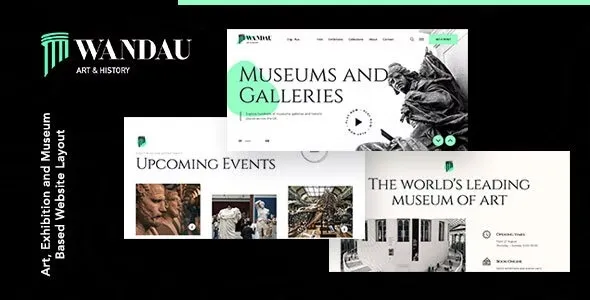










Reviews
There are no reviews yet.