Description
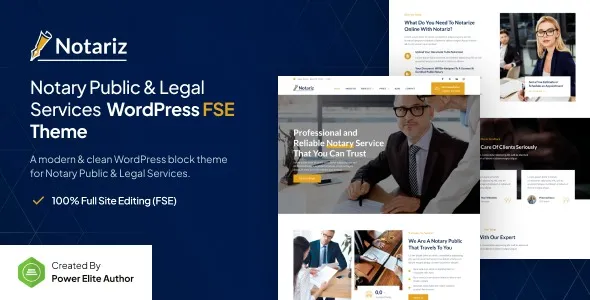
Notariz – Notary Public & Legal Services FSE WordPress Theme is a professional, modern, and fully responsive WordPress theme tailored for notary publics, legal advisors, law firms, and documentation services. Built with Full Site Editing (FSE), Notariz gives you complete control over your website’s design, allowing you to customize headers, footers, templates, and global styles with ease. Its clean layouts and service-focused features make it the perfect solution for building trust and showcasing your legal expertise online.
⚖️ Key Features
- Legal & Notary-Focused Design
Purpose-built templates for notary services, legal firms, attorneys, and documentation specialists.
- Full Site Editing (FSE)
Customize every part of your site, including headers, footers, and templates, using WordPress’s latest FSE capabilities.
- Service & Practice Area Pages
Please ensure that legal services, notary services, contracts, and documentation are presented with professional layouts.
- Appointment & Consultation Booking
You can allow clients to schedule meetings or request consultations directly from your website.
- Team & About Sections
Showcase your legal team, credentials, and expertise to build credibility with potential clients.
- Elementor & Block Editor Compatibility
Flexible customization with drag-and-drop editing tools for beginners and professionals alike.
- Responsive & Mobile-Friendly
Optimized for desktops, tablets, and smartphones, ensuring smooth browsing experiences across all devices.
- Blog & Content Options
Share legal insights, notary tips, and industry updates with customizable blog layouts.
- One-Click Demo Import
You can quickly reproduce demo designs and launch your legal services website with minimal effort.
⚙️ Technical Highlights
- Compatible with WordPress 6+
- Built with Full Site Editing (FSE) for advanced customization
- Elementor-ready for drag-and-drop design flexibility
- WooCommerce-ready for service payments or product sales
- Retina-ready and translation-ready
- SEO-friendly structure for better search visibility
- Lightweight and fast-loading performance
- Includes documentation and regular updates
🎯 Why Choose Notariz?
Notariz is perfect for notaries public, legal advisors, law firms, and documentation services seeking a professional, trustworthy, and easy-to-manage website. Its FSE customization, service-focused layouts, appointment booking, and team showcases make it a complete solution for promoting legal services, engaging clients, and growing your practice online.
Only logged in customers who have purchased this product may leave a review.











Reviews
There are no reviews yet.