

Description
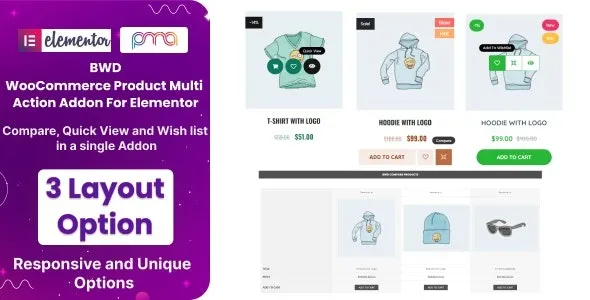
BWD WooCommerce Product Multi Action – Addon for Elementor is a powerful WordPress Elementor addon that enhances WooCommerce product pages with advanced interactive actions and dynamic features. It helps businesses, agencies, and e‑commerce stores create engaging product displays that boost conversions and improve user experience.
🌐 Overview
- Purpose: Add multiple interactive product actions to WooCommerce layouts.
- Audience: E‑commerce stores, agencies, designers, and businesses.
- Integration: Works seamlessly with Elementor and WooCommerce.
🔑 Key Features
- Multi‑Action Buttons: Add “Add to Cart,” “Wishlist,” “Quick View,” “Compare,” and other product actions in one place.
- Customizable Styling: Control button design, colors, icons, hover effects, and alignment.
- Dynamic Product Display: Showcase product actions directly on product grids, lists, or single product pages.
- Responsive Design: Optimized for mobile, tablet, and desktop.
- Interactive Effects: Add hover animations and tooltips for better engagement.
- Reusable Templates: Save action layouts and reuse them across multiple product pages.
- Lightweight & Fast: Built for smooth performance without slowing down your store.
⚙️ How It Works
- Install & Activate: Add the addon to your WordPress site.
- Open Elementor: Access the WooCommerce product multi‑action widget.
- Configure Actions: Choose which product actions to display (cart, wishlist, compare, quick view, etc.).
- Customize Styling: Adjust button design, hover effects, and responsiveness.
- Publish: Display interactive product actions across your WooCommerce store.
📊 Comparison Table
| Feature | Default WooCommerce | BWD Product Multi Action |
|---|---|---|
| Add to Cart Button | Basic | Advanced, customizable |
| Wishlist/Compare | No | Yes |
| Quick View | No | Yes |
| Styling Control | Limited | Full customization |
| Responsive Design | Partial | Fully optimized |
⚠️ Considerations
- Requires Elementor & WooCommerce: Works only with both installed.
- Manual Setup: Actions must be configured per product or template.
- Premium License: Some advanced features may be Pro‑only.
✅ Best For
- E‑commerce stores want to boost conversions with interactive product actions.
- Agencies & designers building modern, user‑friendly online shops.
- Businesses showcasing products with advanced engagement options.
- WooCommerce developers streamlining product page functionality.
In short, BWD WooCommerce Product Multi Action – Addon for Elementor empowers WooCommerce stores with advanced product actions like cart, wishlist, compare, and quick view, helping businesses deliver a modern, engaging shopping experience.












Reviews
There are no reviews yet.