

Description
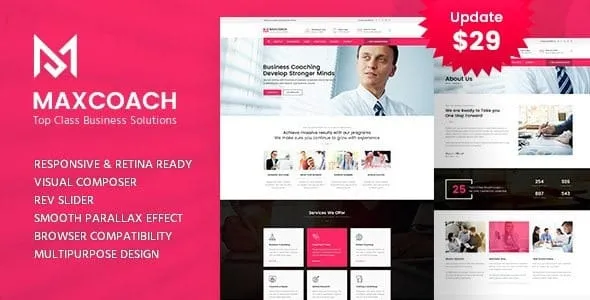
Maxcoach Business Consulting WordPress Theme is designed for professionals, firms, and educators who want to build impactful websites. As a Consulting WordPress Theme, it offers layouts tailored for advisors, auditors, and consultants. With Coaching WordPress Theme features, it supports training programs, workshops, and personal coaching services. The Corporate WordPress Theme design ensures a polished look for company profiles, while Business Training WordPress Theme tools allow organizations to deliver courses and programs online. Integrated with WooCommerce, Maxcoach functions as a WooCommerce business theme, enabling monetization of services and courses. Its responsive business WordPress theme structure ensures smooth performance across devices, while being an SEO optimized WordPress theme helps maximize visibility. Multilingual support makes it a truly global solution.
🌐 Overview
- Theme Name: Maxcoach – Business Consulting WordPress Theme
- Developer: TemplatePath
- Category: Business, Consulting, Training, Coaching WordPress Theme
- Best For: Business consultants, corporate firms, training centers, coaching academies, and professional service providers
🎯 Key Features
- Training & Coaching Focus
- Designed for consulting, coaching, and business education websites
- Pre‑built layouts for courses, services, and team profiles
- Drag‑and‑Drop Page Builder
- Built with Visual Composer for easy customization
- 50+ elements and flexible layouts
- WooCommerce Integration
- Sell courses, consulting packages, or business services online
- Secure payment gateways and product catalog support
- Responsive & Retina Ready
- Optimized for mobile, tablet, and desktop
- Retina‑ready visuals for modern devices
- Multilingual & Translation Ready
- WPML compatibility for global audiences
- RTL support for diverse languages
- Advanced Tools
- Revolution Slider included for dynamic presentations
- Contact Form 7 compatibility for lead generation
- Child theme support for safe customization
📊 Feature Highlights
| Feature | Maxcoach Benefits |
|---|---|
| Business Consulting | Tailored layouts for advisors, auditors, and consultants |
| Training & Coaching | Course pages, instructor profiles, and service showcases |
| Customization | Visual Composer drag‑and‑drop builder |
| WooCommerce Ready | Sell services, courses, or products |
| Responsive Design | Mobile‑friendly, retina‑ready |
| Multilingual Support | WPML & RTL compatibility |
| Professional Tools | Revolution Slider, Contact Form 7 |
👥 Who Should Use Maxcoach?
- Business Consultants & Advisors – Showcase services, expertise, and client testimonials.
- Training Centers & Coaches – Offer courses, workshops, and coaching programs.
- Corporate Firms – Build professional websites for auditing, finance, or management services.
- Entrepreneurs – Launch consulting or coaching businesses with WooCommerce integration.
⚠️ Considerations & Trade‑offs
- Learning Curve: Advanced customization may require time to configure.
- Plugin Dependencies: Some features rely on bundled plugins like Revolution Slider.
- Setup: Demo import simplifies installation but may need adjustments for branding.
Maxcoach – Business Consulting WordPress Theme is a premium, responsive theme designed for training, coaching, consulting, and corporate websites. It offers drag‑and‑drop customization, WooCommerce integration, and multilingual support, making it ideal for professional service providers and business educators. Envato Elements thememag.com









Reviews
There are no reviews yet.