

Description
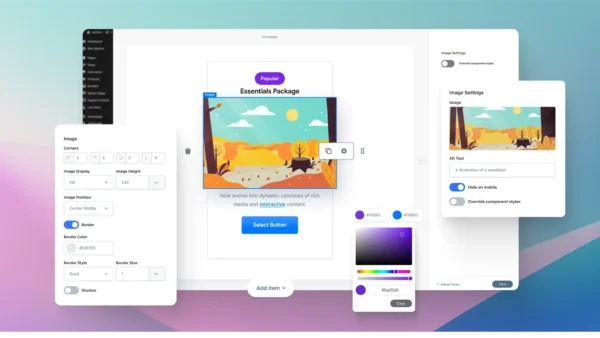
Gravity Forms Enhanced Choices – Jetsloth is a premium add-on that transforms standard radio buttons and checkboxes into rich, customizable choice components. It allows you to use images, HTML, buttons, lists, pills, headings, and even pricing options to create visually engaging, interactive forms that boost user engagement and completion rates. Gravity Forms
🌐 Overview
- Purpose: Redefine choice fields in Gravity Forms with rich media and advanced styling.
- Developer: Jetsloth (certified Gravity Forms developer).
- Audience: Designers, marketers, and businesses seeking visually appealing, interactive forms.
🔑 Key Features
- Rich Media Choices: Replace plain text options with images, HTML, buttons, lists, pills, headings, and pricing blocks.
- Component-Level Control: Customise each option individually, including layout, style, and selected states.
- Theme Builder: Create, export, and import custom themes, or use pre-built designs from Jetsloth’s library.
- Interactive Selection: Options can be chosen via button clicks or full-card selections for improved usability.
- Flexible Styling: Control how choices appear when selected, ensuring consistent branding and a consistent user experience.
- Seamless Integration: Works with Gravity Forms core and other Jetsloth add-ons for enhanced design workflows.
⚙️ How It Works
- Install Plugin: Activate Enhanced Choices by Jetsloth.
- Add Choice Fields: Create radio or checkbox fields in Gravity Forms.
- Apply Rich Media: Insert images, HTML, or styled components into each choice.
- Customise Themes: Use the theme builder to design or import styles.
- Publish Form: Users interact with visually enhanced options instead of plain text.
📊 Comparison Table
| Feature | Enhanced Choices (Jetsloth) | Standard Gravity Forms |
|---|---|---|
| Choice Display | Rich media (images, HTML, pills, pricing) | Text only |
| Customization | Full component-level control | Limited |
| Theme Options | Create/import themes | None |
| User Engagement | High (visual, interactive) | Lower (basic options) |
| Best Use Case | Product selection, surveys, branded forms | General forms |
⚠️ Considerations & Limitations
- Paid Add-On: Requires purchase from Jetsloth.
- Not bundled with Gravity Forms license: Sold separately.
- Design Effort: Requires setup of images or styled components for best results.
✅ Best For
- E-commerce forms (product/package selection with visuals).
- Surveys and polls need engaging, interactive options.
- Event registrations with a styled package or seating choices.
- Agencies and designers creating branded, high-conversion forms.
In short, Jetsloth’s Enhanced Choices add-on elevates Gravity Forms by turning dull text-based options into rich, interactive components—perfect for businesses and creators who want visually engaging, conversion-friendly forms.









Reviews
There are no reviews yet.