
Download All Products Free With Any Membership Plan

Latest Version

Gravity Forms Collapsible Sections – Jetsloth

Buy This Single Latest Version From Here

USD2.99

Gravity Forms Collapsible Sections – Jetsloth
A premium add-on that enhances Gravity Forms by turning section breaks into collapsible, accordion-style panels. It makes long or complex forms easier to navigate, reduces scrolling fatigue, and improves user experience—helping increase form completion rates and conversions with a cleaner, more interactive layout.

Description

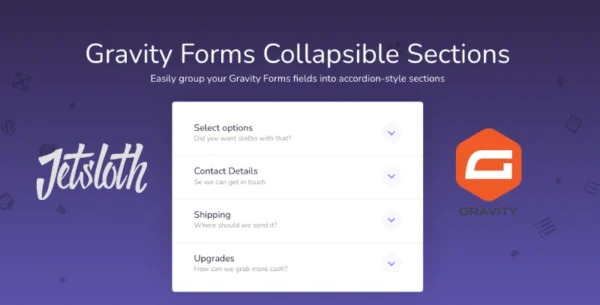
Gravity Forms Collapsible Sections by Jetsloth is a premium add-on that makes long, complex forms easier to navigate by grouping fields into collapsible, accordion-style sections. This improves user experience, reduces form abandonment, and boosts conversion rates.


🌐 Overview

  • Purpose: Simplifies lengthy Gravity Forms by breaking them into collapsible sections.
  • Developer: Jetsloth (certified Gravity Forms developer).
  • Audience: Website owners, marketers, and businesses using Gravity Forms for lead generation, surveys, or applications.

🔑 Key Features

  • Accordion-Style Sections: Group form fields into collapsible panels for cleaner presentation.
  • Improved Conversions: Long forms often discourage users; collapsible sections make them less intimidating.
  • Easy Setup: Add collapsible functionality to existing section breaks without rebuilding forms.
  • Customizable Design: Choose from multiple design styles to match your site’s branding.
  • Compatibility: Works with new and existing Gravity Forms, including complex multi-field forms.
  • Streamlined Navigation: Users can expand/collapse sections as needed, reducing scrolling fatigue.

⚙️ How It Works

  1. Install Plugin: Activate Collapsible Sections by Jetsloth.
  2. Add Section Breaks: Use Gravity Forms’ built-in section break fields.
  3. Enable Collapsible Mode: Configure sections to display as accordions.
  4. Customise Style: Adjust design options to ensure branding consistency.
  5. Publish Form: Users now see a clean, collapsible layout that encourages completion.

📊 Comparison Table

Feature Collapsible Sections (Jetsloth) Standard Gravity Forms
Section Grouping Accordion-style collapsible Static section breaks
Conversion Impact Higher (simplified navigation) Lower (long scrolling)
Design Options Multiple styles available Limited
Ease of Use Simple activation Manual layout only
User Experience Streamlined, interactive Lengthy, overwhelming

⚠️ Considerations & Limitations

  • Paid Add-On: Requires purchase from Jetsloth.
  • Not bundled with Gravity Forms license: Sold separately.
  • Best for long forms: Short forms may not benefit from collapsible sections.

✅ Best For

  • Lead generation forms have many fields.
  • Surveys and applications require detailed information.
  • E-commerce checkout forms with multiple steps.
  • Membership or registration forms that need structured sections.

In short, Jetsloth’s Collapsible Sections add-on transforms long Gravity Forms into user-friendly, accordion-style layouts that improve engagement and conversions.


Reviews

There are no reviews yet.

Only logged in customers who have purchased this product may leave a review.

🛠️ How to Install GPL Themes & Plugins from GPLFox.com

1. Download Your Theme or Plugin

  • Visit GPLFox.com and log in to your account.
  • Browse or search for the theme/plugin you want.
  • Click Download to get the .zip file onto your computer.

2. Install via WordPress Dashboard

  • Log in to your WordPress Admin Panel.
  • Go to:
    • ThemesAppearance > Themes > Add New > Upload Theme
    • PluginsPlugins > Add New > Upload Plugin
  • Click Upload, then select the .zip file you downloaded from GPLFox.
  • Press Install Now.

3. Activate the Theme or Plugin

  • Once installed, click Activate.
  • For themes: your site will immediately switch to the new design.
  • For plugins: the plugin will be enabled and ready to configure.

4. Configure Settings

  • Most premium themes/plugins include customization options.
  • Navigate to the theme’s Customizer or plugin’s Settings panel.
  • Adjust layouts, features, and integrations as needed.

5. Keep Files Updated

  • GPLFox provides updated versions regularly.
  • Re‑download the latest .zip from GPLFox and repeat the upload process to update your theme/plugin.

Tip for Users: Since GPL products don’t require license activation, you can use them right away after installation. Just make sure to keep them up to date for security and compatibility.

Need Hosting Solution ?
Select your currency
Shopping cart4
Visapass – Immigration Consulting WordPress Theme
Visapass – Immigration Consulting WordPress ThemeUSD2.99
TypeSense Search for WooCommerce
TypeSense Search for WooCommerceUSD2.99
GPL Fox Super Unlimited Membership
GPL Fox Super Unlimited Membership LifetimeUSD110.00
Pixelpiernyc – Creative Agency and Portolio
Pixelpiernyc – Creative Agency and PortolioUSD2.99
Total
USD118.97
You may be interested in…
Zusee – Personal Portfolio WordPress Theme
USD2.99
Mental Care WordPress Theme
Mental Care – Therapy & Counseling Psychologist WordPress Theme
USD2.99
Cartify WordPress Theme
Cartify WooCommerce Gutenberg WordPress Theme
USD2.99
Continue shopping
4