

Description
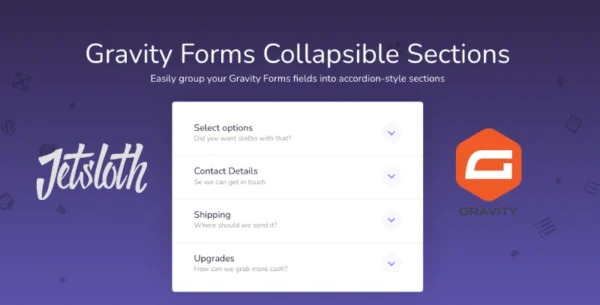
Gravity Forms Collapsible Sections by Jetsloth is a premium add-on that makes long, complex forms easier to navigate by grouping fields into collapsible, accordion-style sections. This improves user experience, reduces form abandonment, and boosts conversion rates.
🌐 Overview
- Purpose: Simplifies lengthy Gravity Forms by breaking them into collapsible sections.
- Developer: Jetsloth (certified Gravity Forms developer).
- Audience: Website owners, marketers, and businesses using Gravity Forms for lead generation, surveys, or applications.
🔑 Key Features
- Accordion-Style Sections: Group form fields into collapsible panels for cleaner presentation.
- Improved Conversions: Long forms often discourage users; collapsible sections make them less intimidating.
- Easy Setup: Add collapsible functionality to existing section breaks without rebuilding forms.
- Customizable Design: Choose from multiple design styles to match your site’s branding.
- Compatibility: Works with new and existing Gravity Forms, including complex multi-field forms.
- Streamlined Navigation: Users can expand/collapse sections as needed, reducing scrolling fatigue.
⚙️ How It Works
- Install Plugin: Activate Collapsible Sections by Jetsloth.
- Add Section Breaks: Use Gravity Forms’ built-in section break fields.
- Enable Collapsible Mode: Configure sections to display as accordions.
- Customise Style: Adjust design options to ensure branding consistency.
- Publish Form: Users now see a clean, collapsible layout that encourages completion.
📊 Comparison Table
| Feature | Collapsible Sections (Jetsloth) | Standard Gravity Forms |
|---|---|---|
| Section Grouping | Accordion-style collapsible | Static section breaks |
| Conversion Impact | Higher (simplified navigation) | Lower (long scrolling) |
| Design Options | Multiple styles available | Limited |
| Ease of Use | Simple activation | Manual layout only |
| User Experience | Streamlined, interactive | Lengthy, overwhelming |
⚠️ Considerations & Limitations
- Paid Add-On: Requires purchase from Jetsloth.
- Not bundled with Gravity Forms license: Sold separately.
- Best for long forms: Short forms may not benefit from collapsible sections.
✅ Best For
- Lead generation forms have many fields.
- Surveys and applications require detailed information.
- E-commerce checkout forms with multiple steps.
- Membership or registration forms that need structured sections.
In short, Jetsloth’s Collapsible Sections add-on transforms long Gravity Forms into user-friendly, accordion-style layouts that improve engagement and conversions.








Reviews
There are no reviews yet.