

Description
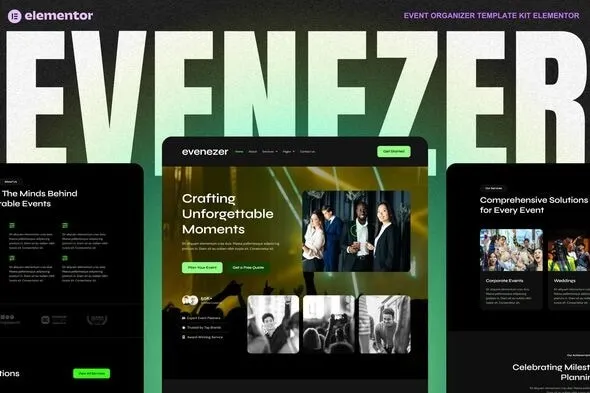
The Evenizer – Event Organizer Elementor Template Kit at GPL Fox is the ultimate solution for building professional event websites. This event organizer WordPress template is designed for conferences, seminars, and festivals, offering modern layouts and easy customization. As a conference WordPress theme and seminar WordPress template, it integrates seamlessly with Elementor for drag‑and‑drop design and WooCommerce for ticket sales or event bookings. Built as a responsive event template kit, it ensures smooth performance across devices, while being an SEO‑friendly event organizer theme helps boost visibility in search engines. Whether you’re managing a festival WordPress theme or a corporate event, Evenizer delivers flexibility, speed, and professional design.
🌐 Overview
- Purpose: Build sleek, responsive websites for events, conferences, and festivals.
- Audience: Event organizers, corporate planners, agencies, and community groups.
- Integration: Works seamlessly with WordPress and Elementor, requiring no extra premium plugins.
🔑 Key Features
- Pre‑Built Pages: Includes home, about, event schedule, speakers, tickets, blog, and contact templates.
- Event‑Focused Design: Tailored layouts for showcasing programs, speakers, and ticketing options.
- Responsive & Mobile‑Friendly: Optimized for accessibility across devices.
- Drag‑and‑Drop Editing: Customize layouts, colors, and content easily with Elementor.
- Global Styles: Consistent typography and branding across all templates.
- Speaker Profiles: Highlight keynote speakers and presenters with dedicated sections.
- Event Schedule: Present sessions, workshops, and timelines in a clear format.
- Ticketing Integration: Showcase pricing tables and ticket options with call‑to‑action blocks.
- Blog & Updates: Share event news, announcements, and promotional content.
⚙️ How It Works
- Install & Activate: Add Evenizer via Template Kit Import.
- Import Templates: Load pre‑built layouts into your WordPress site.
- Customize Content: Replace demo text, images, and branding with your own.
- Publish: Launch a professional event website in minutes.
📊 Comparison Table
| Feature | Standard Elementor | Evenizer Template Kit |
|---|---|---|
| Event Layouts | Generic | Tailored for events |
| Speaker Profiles | Manual setup | Built‑in templates |
| Event Schedule | Limited | Dedicated layouts |
| Ticketing Sections | Basic | Optimized CTAs |
⚠️ Considerations
- Requires Elementor to be installed.
- Ticketing functionality may require WooCommerce or third‑party plugins.
- Content replacement is necessary to personalize demo layouts.
✅ Best For
- Conference organizers need a professional online presence.
- Festival planners showcase programs and ticketing.
- Corporate event managers promote seminars and workshops.
- Agencies building event websites for clients.
In short, Evenizer – Event Organizer Elementor Template Kit for WordPress delivers modern, responsive, and event‑focused layouts that help organizers promote, manage, and launch professional event websites quickly and effectively.









Reviews
There are no reviews yet.