
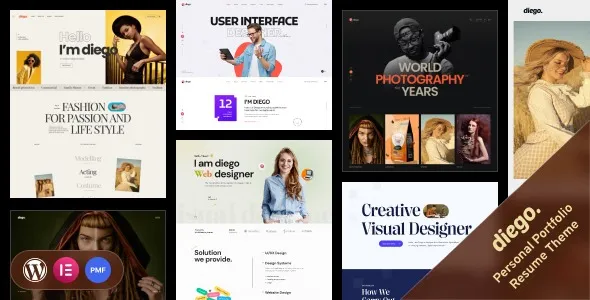

Description
🌟 Diego – Creative Personal Portfolio & Resume WordPress Theme + RTL
Diego is a modern, stylish, and fully responsive WordPress theme designed for professionals who want to showcase their creativity, skills, and achievements in a visually stunning way. Whether you’re a designer, developer, freelancer, photographer, or creative agency, Diego helps you build a personal brand that stands out. With built‑in RTL (Right‑to‑Left) language support, it’s perfect for global audiences and multilingual portfolios.
✨ Key Features
- Clean & Creative Design – Minimal yet impactful layouts crafted to highlight your portfolio and resume.
- One‑Click Demo Import – Get started instantly with ready‑made demo content.
- Responsive & Retina Ready – Optimized for all devices: desktops, tablets, and smartphones.
- RTL Language Support – Seamlessly adapt your site for Arabic, Hebrew, Persian, and other RTL languages.
- Portfolio Showcase – Multiple grid and masonry layouts to present your projects beautifully.
- Resume & CV Sections – Dedicated templates for education, experience, and skills.
- Blog Integration – Share your thoughts, case studies, or industry insights with a stylish blog.
- Customizable Elements – Unlimited color options, Google Fonts, and flexible typography settings.
- Drag‑and‑Drop Builder Compatibility – Works smoothly with popular page builders for easy customization.
- SEO Optimized – Built with clean code and best practices to help your portfolio rank higher.
- Fast Loading & Lightweight – Ensures smooth performance and better user experience.
- Cross‑Browser Compatibility – Tested on all major browsers for flawless display.
- Regular Updates & Support – Stay secure and up‑to‑date with ongoing improvements.
🎨 Who Is It For?
- Freelancers looking to impress potential clients with a professional online presence
- Designers, developers, and creatives who want to showcase their portfolio in style
- Agencies and studios needing a sleek resume/portfolio showcase for their team
- Professionals seeking a personal branding website with resume + blog integration
🌍 Why Choose Diego?
Diego combines elegance, functionality, and flexibility in one theme. It’s not just a portfolio—it’s your digital identity. With RTL support, global reach, and easy customization, Diego empowers you to create a website that reflects your personality and professionalism.









Reviews
There are no reviews yet.