

Description
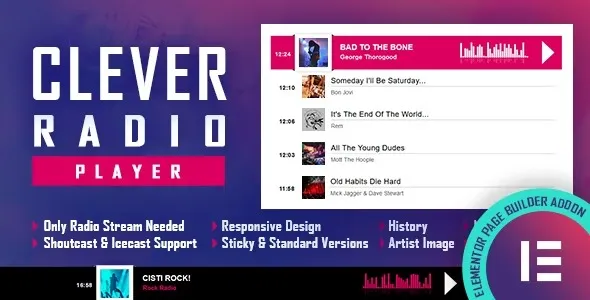
The CLEVER HTML5 Radio Player With History – Elementor Addon at GPL Fox is a premium radio streaming WordPress addon designed for professional websites. With this buy HTML5 radio player WordPress plugin, you can stream live broadcasts while offering a WordPress audio player with history so listeners can revisit previously played tracks. It works seamlessly as an Elementor radio player plugin, giving you drag‑and‑drop customization options. Perfect for radio stations, music blogs, and podcasters, this live radio streaming WordPress addon is responsive, lightweight, and customizable. As a SEO‑friendly radio player WordPress addon, it ensures smooth playback across devices while enhancing user engagement.
🌐 Addon Overview
- Name: CLEVER HTML5 Radio Player With History – Elementor Addon
- Category: Audio / Streaming / Elementor Addon
- Best For: Online radio stations, music blogs, podcasters, and entertainment websites
🚀 Key Features
- HTML5 Radio Streaming: Reliable, cross‑platform audio playback.
- Track History: Displays previously played songs or shows for listeners.
- Elementor Integration: Drag‑and‑drop widget for easy customization.
- Responsive Design: Optimized for mobile, tablet, and desktop.
- Customizable Player: Adjust colors, layouts, and styles to match branding.
- SEO‑Friendly: Lightweight code for fast performance and better rankings.
- User Engagement: Keeps audiences connected with track history and live streaming.
🛠️ Use Cases
- Radio Stations: Stream live broadcasts with track history.
- Music Blogs: Showcase playlists and past tracks.
- Podcasters: Provide live episodes with playback history.
- Entertainment Sites: Add interactive radio features to engage visitors.
📊 Feature Highlights
| Feature | CLEVER Radio Player | Standard Audio Player |
|---|---|---|
| HTML5 Streaming | ✅ Yes | ⚪ Limited |
| Track History | ✅ Included | ⚪ Absent |
| Elementor Integration | ✅ Full | ⚪ None |
| Responsive Design | ✅ Optimized | ⚪ Basic |
| Customization Options | ✅ Flexible | ⚪ Restricted |
✅ Final Takeaway
CLEVER HTML5 Radio Player With History – Elementor Addon is a dynamic WordPress extension designed to bring live radio streaming directly into your website. Built with HTML5 technology, this addon ensures smooth playback across all devices while offering a modern interface that integrates seamlessly with Elementor. The standout feature is its history playback, allowing listeners to revisit previously aired tracks or shows, enhancing user engagement and retention.
The CLEVER HTML5 Radio Player With History – Elementor Addon is the perfect solution for websites that want to deliver live radio streaming with track history in a stylish, responsive, and customizable format. Whether you’re running a radio station, podcast, or music blog, this addon enhances user experience and keeps audiences engaged. Available at GPL Fox, it’s a premium tool for modern audio streaming.









Reviews
There are no reviews yet.