Latest Version

Buy This Single Latest Version From Here

Limited Time Offer

$2.99

Sales Ongoing

BWD Unique Back to Top – Addon for Elementor
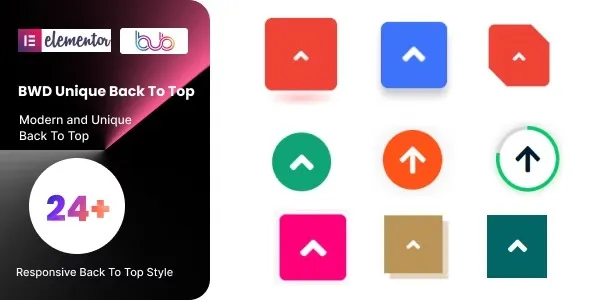
A creative WordPress addon that adds stylish and customizable “Back to Top” buttons to your Elementor site. It offers multiple modern designs, smooth scrolling effects, and interactive hover animations to enhance navigation and user experience. With options for icons, text, positioning, and full styling control, this lightweight and responsive addon is perfect for agencies, businesses, bloggers, and e‑commerce stores looking to improve usability while adding design flair.

Description

BWD Unique Back to Top – Addon for Elementor

BWD Unique Back to Top is a creative WordPress addon for Elementor that adds stylish and customizable “Back to Top” buttons to your website. Instead of plain scroll‑to‑top icons, this addon offers modern, animated, and visually engaging designs that improve navigation and enhance user experience. It’s perfect for agencies, businesses, bloggers, and e‑commerce stores that want to combine functionality with design flair.


🌐 Overview

  • Purpose: Provide unique, customizable “Back to Top” buttons for smooth navigation.
  • Audience: Agencies, freelancers, businesses, bloggers, and online shops.
  • Integration: Works seamlessly with Elementor’s drag‑and‑drop editor.

🔑 Key Features

  • Multiple Button Styles: Choose from creative, modern, and professional designs.
  • Customizable Styling: Control colors, typography, shapes, and hover effects.
  • Animated Scroll: Smooth scrolling effect for better user experience.
  • Icon & Text Options: Add icons, labels, or both to the button.
  • Position Control: Place the button anywhere on the page (left, right, bottom).
  • Interactive Animations: Eye‑catching hover and entrance effects.
  • Responsive Design: Optimized for mobile, tablet, and desktop.
  • Lightweight Performance: Stylish buttons without slowing down your site.

⚙️ How It Works

  1. Install & Activate: Add the addon to your WordPress site.
  2. Open Elementor: Access the “Back to Top” widget.
  3. Choose Style: Select from multiple button designs.
  4. Customize Settings: Adjust colors, icons, text, and animations.
  5. Publish: Add a professional “Back to Top” button to your site.

📊 Comparison Table

Feature Default Elementor BWD Unique Back to Top
Back to Top Button No Yes
Multiple Styles No Creative & modern options
Animated Scroll Limited Smooth, customizable
Responsive Design Partial Fully optimized

⚠️ Considerations

  • Requires Elementor: Works only with Elementor installed.
  • Design Balance: Best used to enhance navigation, not to clutter pages.

✅ Best For

  • Agencies & freelancers designing modern websites.
  • Businesses are improving site navigation and user experience.
  • E‑commerce stores offering smooth browsing for product pages.
  • Bloggers & creators enhancing readability with stylish navigation aids.

In short, BWD Unique Back to Top for Elementor is a functional and stylish addon that transforms ordinary scroll‑to‑top buttons into modern, animated, and customizable navigation tools—perfect for improving usability and adding design flair to any website.

Reviews

There are no reviews yet.

Only logged in customers who have purchased this product may leave a review.

🛠️ How to Install GPL Themes & Plugins from GPLFox.com


1. Download Your Theme or Plugin

  • Visit GPLFox.com and log in to your account.
  • Browse or search for the theme/plugin you want.
  • Click Download to get the .zip file onto your computer.

2. Install via WordPress Dashboard

  • Log in to your WordPress Admin Panel.
  • Go to:
    • ThemesAppearance > Themes > Add New > Upload Theme
    • PluginsPlugins > Add New > Upload Plugin
  • Click Upload, then select the .zip file you downloaded from GPLFox.
  • Press Install Now.

3. Activate the Theme or Plugin

  • Once installed, click Activate.
  • For themes: your site will immediately switch to the new design.
  • For plugins: the plugin will be enabled and ready to configure.

4. Configure Settings

  • Most premium themes/plugins include customization options.
  • Navigate to the theme’s Customizer or plugin’s Settings panel.
  • Adjust layouts, features, and integrations as needed.

5. Keep Files Updated

  • GPLFox provides updated versions regularly.
  • Re‑download the latest .zip from GPLFox and repeat the upload process to update your theme/plugin.

Tip for Users: Since GPL products don’t require license activation, you can use them right away after installation. Just make sure to keep them up to date for security and compatibility.
Need Hosting Solution ?