
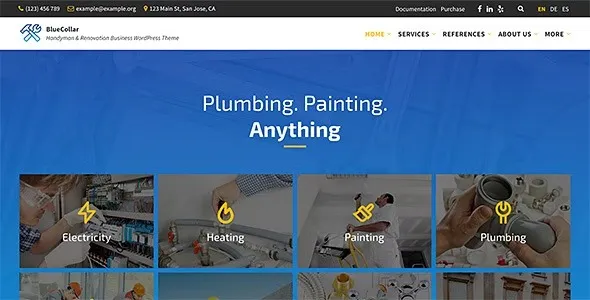

Description
The BlueCollar Handyman & Renovation WordPress Theme is a contractor WordPress theme designed for service providers such as plumbers, electricians, painters, and renovation companies. As a handyman WordPress theme, it offers dedicated service modules, portfolio showcases, and testimonial sections to highlight expertise. With renovation WordPress theme features, BlueCollar supports project galleries, FAQs, and team member profiles. Its responsive WordPress theme design ensures smooth performance across devices, while being an SEO optimized WordPress theme helps maximize visibility. Compatible with Elementor service theme and WPBakery business theme customization, BlueCollar provides flexibility for building professional service websites.
🌐 Overview
- Theme Name: BlueCollar – Handyman & Renovation Business WordPress Theme
- Developer: LSVRthemes
- Category: Service / Business WordPress Theme
- Best For: Handymen, renovation companies, electricians, plumbers, painters, and contractors
🎯 Key Features
- Service Modules
- Dedicated post types for services, portfolios, testimonials, team members, FAQs, and galleries
- Modular setup allows enabling/disabling sections as needed
- Multi‑Page Builder Support
- Compatible with Gutenberg, Elementor, and WPBakery
- Choose your preferred editor for customization
- One‑Click Demo Import
- Quick setup with demo content, theme options, and widgets
- Stock images not included
- SEO & Performance Optimized
- Clean, SEO‑friendly code designed for speed and accessibility
- RankMath compatible for higher search visibility
- Responsive & Translation Ready
- Mobile‑friendly design with automatic RTL switching
- WPML support and .po/.mo files for multilingual sites
- Developer Friendly
- Child theme included for customization
- Shortcode generator and cleanly commented code
📊 Feature Highlights
| Feature | BlueCollar Benefits |
|---|---|
| Service Modules | Showcase services, portfolios, testimonials |
| Page Builder Support | Gutenberg, Elementor, WPBakery compatible |
| Demo Import | One‑click setup with content & widgets |
| SEO Optimization | Clean code, RankMath compatible |
| Responsive Design | Mobile‑friendly, RTL ready |
| Developer Tools | Child theme, shortcode generator |
👥 Who Should Use BlueCollar Service Business WordPress Theme?
- Handymen & Contractors – Present services and manage client inquiries.
- Renovation Companies – Showcase projects and portfolios.
- Electricians & Plumbers – Build credibility with testimonials and service pages.
- Painters & Builders – Promote services with modern layouts.
⚠️ Considerations & Trade‑offs
- Learning Curve: Multiple page builder options may require familiarity.
- Plugin Dependencies: Some advanced features rely on WPBakery or Elementor.
- Customization Depth: Highly unique designs may need developer input.
BlueCollar – Handyman & Renovation Business WordPress Theme is a professional, responsive theme built specifically for service providers such as plumbers, electricians, painters, renovators, and contractors. It offers modular service layouts, portfolio showcases, testimonials, and full compatibility with Gutenberg, Elementor, and WPBakery page builders.









Reviews
There are no reviews yet.