

Description
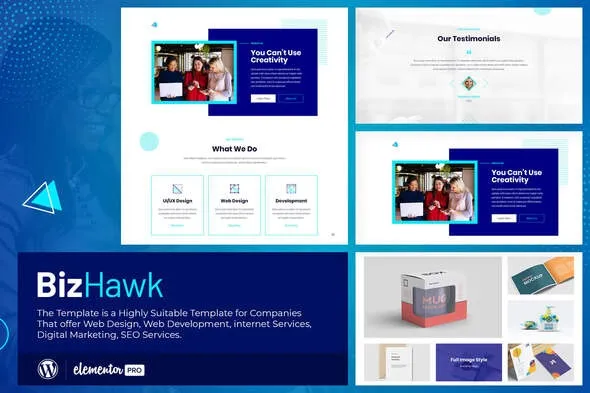
BizHawk – Corporate Agency Elementor Template Kit for WordPress
BizHawk is a polished and versatile Elementor template kit designed for corporate agencies, business consultancies, professional firms, and service providers. It delivers clean, conversion‑focused layouts that emphasize services, portfolios, team profiles, and client testimonials. Built for WordPress, BizHawk enables businesses to launch professional websites without coding quickly.
🌐 Overview
- Purpose: Build corporate and agency websites with modern, professional design.
- Audience: Corporate agencies, consulting firms, business service providers, and professional teams.
- Integration: Works seamlessly with WordPress and Elementor, requiring no extra premium plugins.
🔑 Key Features
- Pre‑Built Pages: Includes home, about, services, portfolio, team, blog, and contact templates.
- Service Showcases: Highlight consulting, corporate solutions, and business services.
- Team Profiles: Present staff bios, qualifications, and expertise.
- Responsive & Mobile‑Friendly: Optimized for smooth performance across all devices.
- Drag‑and‑Drop Editing: Easily customize layouts, colors, and content with Elementor.
- Global Styles: Consistent typography and branding across all templates.
- Portfolio Layouts: Showcase projects, case studies, and corporate achievements.
- Testimonials: Build credibility with client feedback and success stories.
- Blog Integration: Share industry insights, updates, and thought leadership.
- Call‑to‑Action Blocks: Drive inquiries, sign‑ups, and conversions with optimized CTAs.
⚙️ How It Works
- Install & Activate: Add BizHawk via Template Kit Import.
- Import Templates: Load pre‑built layouts into your WordPress site.
- Customize Content: Replace demo text, images, and branding with your own.
- Publish: Quickly launch a professional corporate agency website.
📊 Comparison Table
| Feature | Standard Elementor | BizHawk Template Kit |
|---|---|---|
| Corporate Layouts | Generic | Tailored for agencies & firms |
| Team Profiles | Manual setup | Built‑in templates |
| Portfolio Showcases | Limited | Dedicated sections |
| Conversion CTAs | Basic | Optimized for leads & sign‑ups |
⚠️ Considerations
- Requires Elementor to be installed.
- Content replacement is necessary to personalize demo layouts.
- Integration with CRM or business tools may be needed for advanced lead capture.
✅ Best For
- Corporate agencies showcasing services and expertise.
- Consulting firms promote solutions and case studies.
- Business service providers are building a professional online presence.
- Agencies creating corporate websites for clients.
In short, BizHawk – Corporate Agency Elementor Template Kit for WordPress delivers clean, responsive, and business‑focused layouts that help agencies and firms quickly launch polished websites.









Reviews
There are no reviews yet.