
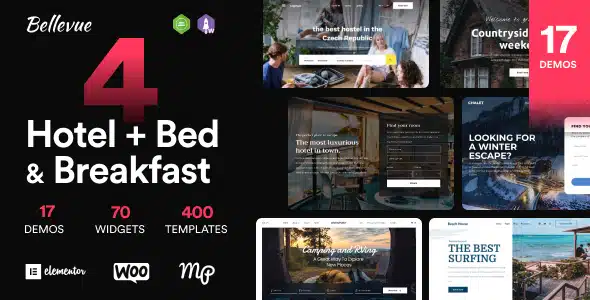

Description
The Bellevue Hotel WordPress Theme – Stunning B&B Booking Solution at GPL Fox is a premium hospitality theme designed for hotels, resorts, and vacation rentals. With this buy hotel WordPress theme, you can create elegant layouts to showcase rooms, amenities, and services. It works perfectly as a premium B&B WordPress theme and resort WordPress template for sale, offering a powerful booking system for reservations. Built with Elementor, this elementor hotel theme is easy to customize, while WooCommerce integration makes it a woocommerce booking WordPress theme for secure payments. Responsive and lightweight, Bellevue is an SEO‑friendly hospitality WordPress theme that ensures your business attracts more guests and builds a professional online presence.
🌐 Theme Overview
- Name: Bellevue – Hotel WordPress Theme
- Category: Hospitality / Hotel / Booking WordPress Theme
- Best For: Hotels, resorts, B&Bs, vacation rentals, and boutique hospitality businesses
🚀 Key Features
- Advanced Booking System – Manage reservations with calendars and flexible pricing.
- Elementor Integration – Customize layouts with drag‑and‑drop ease.
- WooCommerce Ready – Accept secure payments for bookings and packages.
- Responsive & Retina Ready – Optimized for mobile, tablet, and desktop.
- SEO‑Friendly Design – RankMath compatible for higher visibility.
- Hospitality Layouts – Showcase rooms, amenities, and services elegantly.
- Blog & Content Tools – Share travel tips, promotions, and updates.
🛠️ Use Cases
- Hotels & Resorts – Present rooms, facilities, and booking options.
- Bed & Breakfasts – Offer online reservations with charming layouts.
- Vacation Rentals – Display property details and accept bookings.
- Hospitality Agencies – Build professional websites for clients.
📊 Feature Highlights
| Feature | Bellevue Benefits |
|---|---|
| Booking System | Manage reservations & pricing |
| Elementor Customization | Drag‑and‑drop builder |
| WooCommerce Integration | Secure payments & packages |
| Responsive Design | Mobile‑friendly, retina‑ready |
| SEO Optimization | RankMath compatible |
| Hospitality Layouts | Showcase rooms & amenities |
✅ Final Takeaway
Bellevue – Hotel WordPress Theme: Stunning B&B Booking Solution is a premium hospitality theme designed for hotels, resorts, bed & breakfasts, and vacation rentals. With its elegant layouts and powerful booking system, Bellevue makes it easy to showcase rooms, amenities, and services while allowing guests to book directly online. Built with Elementor for drag‑and‑drop customization, WooCommerce integration for secure payments, and SEO‑friendly design, it’s the perfect solution for hospitality businesses that want to attract more guests and grow their online presence. Fully responsive and retina‑ready, Bellevue ensures a seamless experience across all devices.
The Bellevue Hotel WordPress Theme is a stunning B&B booking solution for hospitality businesses. With Elementor customization, WooCommerce integration, responsive layouts, and SEO‑friendly design, Bellevue empowers hotels, resorts, and vacation rentals to build professional websites that attract guests and streamline bookings. Available at GPL Fox, it’s the ideal theme for modern hospitality websites.









Reviews
There are no reviews yet.