

Description
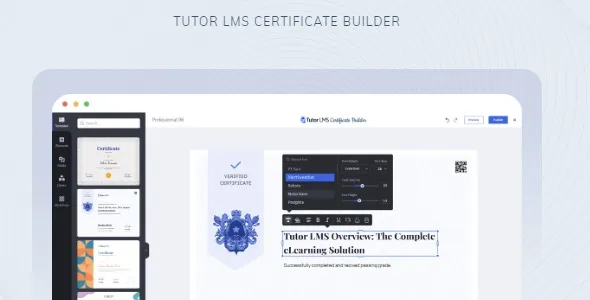
The Tutor LMS Certificate Builder at GPL Fox is a powerful WordPress LMS certificate plugin that allows educators to design and issue professional course completion certificates. With its drag and drop certificate builder, instructors can customize layouts, add logos, and insert dynamic fields certificate plugin elements such as student names, course titles, and completion dates. This Tutor LMS certificate addon ensures learners receive visually appealing and credible certificates that boost recognition. Perfect for universities, training centers, and online academies, it functions as a custom course certificate WordPress solution that enhances credibility while remaining an SEO friendly LMS plugin for modern e‑learning platforms.
Overview
- Purpose: Create and issue professional certificates for Tutor LMS courses.
- Audience: Schools, universities, training centers, online academies, and corporate learning platforms.
- Integration: Works seamlessly with Tutor LMS and WordPress.
Key Features
- Drag‑and‑Drop Builder: Easily design certificates with a visual editor.
- Customizable Templates: Choose from pre‑built designs or create your own.
- Dynamic Fields: Automatically insert student names, course titles, and completion dates.
- Branding Options: Add logos, signatures, and institutional details.
- Responsive Design: Certificates look great on all devices.
- Professional Recognition: Boosts credibility for learners and institutions.
How It Works
- Install & Activate: Add the Certificate Builder to Tutor LMS.
- Choose a Template: Select from pre‑built designs or start fresh.
- Customize: Use drag‑and‑drop tools to add text, logos, and dynamic fields.
- Assign Certificates: Link certificates to specific courses.
- Issue Certificates: Automatically generate and deliver certificates upon course completion.
Comparison Table
| Feature | Standard Tutor LMS | Tutor LMS Certificate Builder |
|---|---|---|
| Certificate Issuance | Limited | Full customization & automation |
| Templates | Basic | Pre‑built + custom designs |
| Dynamic Fields | Not available | Available |
| Branding Options | Minimal | Advanced logos, signatures, details |
| Professional Recognition | Moderate | High credibility & trust |
Best For
- Universities & Colleges issuing official course completion certificates.
- Training Centers & Academies providing professional recognition.
- Corporate Learning Programs certifying employee training.
- Online Instructors enhancing credibility with personalized certificates.
In Short
Tutor LMS Certificate Builder is a premium add‑on for the Tutor LMS plugin that allows instructors and institutions to design and issue professional course completion certificates. With a drag‑and‑drop interface, customizable templates, and dynamic fields, it ensures learners receive visually appealing and credible certificates upon finishing their courses.
This add‑on empowers educators to personalize certificates with student names, course titles, completion dates, and institutional branding. It’s perfect for universities, training centers, online academies, and corporate learning programs that want to enhance credibility and recognition for their learners.
Tutor LMS Certificate Builder is the ultimate solution for creating professional, customizable certificates in WordPress. With drag‑and‑drop design, dynamic fields, and branding options, it ensures learners receive credible recognition for their achievements while helping institutions build trust and authority.











Reviews
There are no reviews yet.