

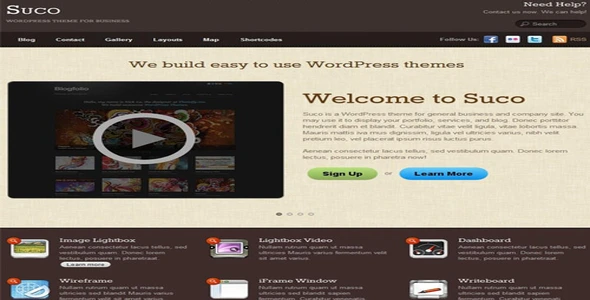

Description
The Themify Suco WordPress Theme is a premium restaurant WordPress theme designed for cafés, bakeries, and food businesses. This café WordPress template offers elegant layouts for menus, reservations, and promotions. With WooCommerce integration, the bakery WooCommerce theme allows online food ordering, secure payments, and product management. Elementor support ensures the food restaurant business WordPress theme can be customized with drag‑and‑drop ease. Fully responsive and retina‑ready, the responsive restaurant WordPress theme delivers a seamless experience across devices. Whether you need a SEO optimized restaurant WordPress theme for visibility or a modern café WordPress theme for branding, Suco provides the perfect solution for building a professional food and beverage website.
🌐 Overview
- Theme Name: Themify Suco WordPress Theme
- Developer: Themify
- Platform: WordPress (requires WP 5+)
- Audience: Businesses, agencies, creatives, bloggers, and online shops
🔑 Key Features
- Responsive Layout: Works seamlessly on desktops, tablets, and mobile devices.
- Customizable Slider: Highlight services, products, or promotions on the homepage.
- Call‑to‑Action Areas: Built‑in sections for conversion‑focused messaging.
- WordPress Post Formats: Supports images, videos, galleries, quotes, etc. (similar to Tumblr).
- Homepage Widgets: Add welcome text, product highlights, or optional widgets.
- Menus & Footer: Custom header/footer menus, footer text, and up to 4 widget columns.
- Theme Skins: 9 pre‑designed color schemes for quick branding.
- HTML5 & CSS3: Modern coding standards with child theme support.
- WooCommerce Integration: Transform your site into an online shop.
- Drag & Drop Builder: Create layouts with parallax, background video, and animations.
- SEO Optimized: Lightweight, mobile‑friendly, and coded for search visibility.
- Demo Import: Replicate the demo setup instantly, then replace it with your own content.
- Google Fonts: Access 1500+ fonts for typography customization.
- Auto Updates: One‑click updates directly from the WordPress admin panel.
📊 Benefits
| Feature | Standard Theme | Suco Theme |
|---|---|---|
| Homepage Design | Generic | Slider + highlights + CTA |
| Post Formats | Limited | Image, video, gallery, quote |
| E‑commerce Support | Minimal | Full WooCommerce integration |
| Customization | Basic | Drag‑and‑drop + skins |
| Performance | Average | Optimized for PageSpeed & SEO |
⚠️ Considerations
- Business Focused: Best suited for service/product promotion; may feel too corporate for purely creative blogs.
- Customization Learning Curve: Themify Builder offers flexibility but requires time to master.
- Premium License: Needed for full features, updates, and support.
✅ Best For
- Small businesses & agencies needing a professional online presence.
- Service providers showcasing products or portfolios.
- E‑commerce shops powered by WooCommerce.
- Creative bloggers who want Tumblr‑style post formats with responsive layouts.
Themify Suco WordPress Theme is a versatile WordPress theme that blends business functionality with creative flexibility—perfect for agencies, shops, and professionals who want a responsive, SEO‑friendly site with modern design tools.










Reviews
There are no reviews yet.