

Description
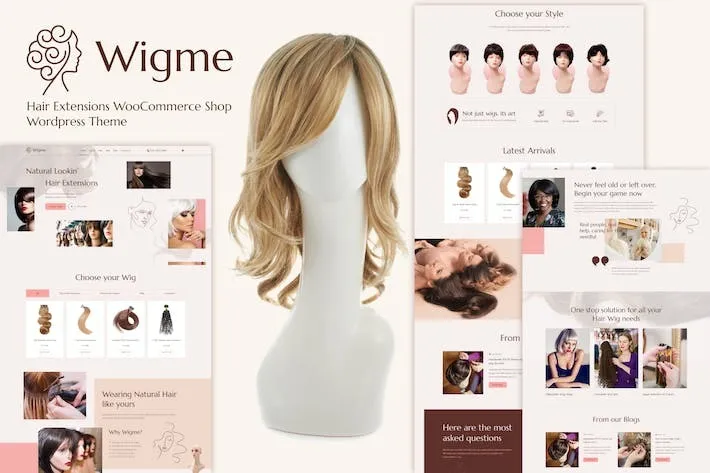
Wigme – Hair Extensions WooCommerce Shop
Wigme – Hair Extensions WooCommerce Shop is a premium WordPress solution designed for businesses selling hair extensions, wigs, and beauty products online. Built on WooCommerce, it provides a stylish, user-friendly storefront optimized for showcasing hair products with high-quality visuals, customizable product pages, and seamless shopping experiences. This shop theme/addon is tailored for beauty brands, salons, and e-commerce entrepreneurs seeking to create a professional online presence and boost sales.
🌐 Overview
- Purpose: Provide a complete WooCommerce-powered shop for selling hair extensions and related products.
- Audience: Hair extension retailers, wig shops, beauty brands, and salons.
- Integration: Works seamlessly with WooCommerce, WordPress, and popular payment gateways.
🔑 Key Features
- Modern Storefront Design: Elegant layouts optimized for beauty and fashion products.
- Product Showcase: High-quality image galleries, zoom features, and detailed product descriptions.
- WooCommerce Integration: Full support for product variations, stock management, and secure checkout.
- Customizable Pages: Tailor product, category, and landing pages to match your brand.
- Responsive Design: Mobile-friendly layouts ensure a smooth shopping experience across all devices.
- Advanced Filtering: Allow customers to sort by length, color, texture, or price.
- Customer Reviews: Build trust with ratings and testimonials.
- Marketing Tools: Compatible with coupons, discounts, and upsell features.
- SEO-Friendly: Optimized structure for better search engine visibility.
- Easy Management: Intuitive dashboard for product uploads, inventory, and order tracking.
⚙️ How It Works
- Install & Activate: Set up the Wigme shop theme/addon on your WordPress site.
- Add Products: Upload hair extensions, wigs, or beauty items with images and details.
- Customize Storefront: Adjust layouts, colors, and branding to fit your business.
- Enable Payments: Connect WooCommerce with PayPal, Stripe, or other gateways.
- Launch Shop: Customers browse, filter, and purchase products seamlessly.
📊 Comparison Table
| Feature | Standard WooCommerce | Wigme Hair Extensions Shop |
|---|---|---|
| Beauty-Focused Design | Generic | Specialized for hair/wigs |
| Product Filtering | Basic | Advanced (length, color) |
| Storefront Customization | Limited | Enhanced |
| Customer Experience | Standard | Tailored for the beauty niche |
⚠️ Considerations
- Requires WooCommerce & WordPress.
- High-quality product images are recommended for the best results.
- Theme customization may require basic WordPress knowledge.
✅ Best For
- Hair extension retailers are selling online.
- Beauty brands are expanding into e-commerce.
- Salons offering wigs or hair products.
- Entrepreneurs are launching niche beauty shops.
In short, Wigme – Hair Extensions WooCommerce Shop provides a complete, stylish, and optimized online store solution for selling hair extensions and beauty products, helping businesses deliver a professional shopping experience and grow their brand.










Reviews
There are no reviews yet.