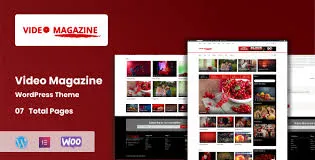
Video Magazine is a dynamic WordPress magazine theme built for video bloggers, online publishers, and entertainment websites. It combines a clean magazine-style layout with smooth video embedding, Elementor support, and SEO optimization—making it ideal for sites that mix written and video storytelling. ThemeForest themevalue.com
🌐 Overview
- Purpose: Create modern magazine-style websites with strong video integration.
- Audience: Video bloggers, online magazines, news portals, and entertainment publishers.
- Developer: Bytelabx (ThemeForest).
- Integration: Works seamlessly with Elementor page builder.
🔑 Key Features
- Optimized for Video Content: Effortlessly embed YouTube, Vimeo, or self-hosted videos.
- Elementor Page Builder Support: Drag-and-drop customization for layouts and pages.
- Multiple Homepage Layouts: Choose from grid, blog, and magazine-style templates.
- SEO & Speed Optimized: Fast-loading structure designed for better search rankings.
- Responsive Design: Mobile-friendly layouts that adapt across devices.
- Clean & Modern UI: Energetic design suitable for fashion, movies, and entertainment niches.
- Regular Updates: Maintained with new features and compatibility improvements.
⚙️ How It Works
- Install Theme: Upload and activate Video Magazine in WordPress.
- Customize with Elementor: Build pages using drag-and-drop blocks.
- Embed Videos: Add YouTube, Vimeo, or self-hosted videos directly into posts or pages.
- Choose Layouts: Select from multiple homepage and category page styles.
- Publish Content: Combine video and text for engaging magazine-style storytelling.
📊 Comparison Table
| Feature |
Video Magazine Theme |
Standard WP Themes |
| Video Embedding |
Optimized for YouTube/Vimeo |
Basic support |
| Page Builder |
Elementor integration |
Varies |
| Homepage Layouts |
Multiple magazine/grid/blog |
Limited |
| SEO Optimization |
Built-in speed & SEO tools |
Theme-dependent |
| Entertainment Focus |
Tailored for video & media |
General-purpose |
⚠️ Considerations & Limitations
- Premium Theme: Available on ThemeForest, requires purchase.
- Niche Focus: Best suited for video-heavy sites; may not fit minimalist blogs.
- Customization: Advanced styling may require knowledge of Elementor.
✅ Best For
- Video bloggers showcasing YouTube or Vimeo content.
- Online magazines mix articles and video features.
- Entertainment portals covering movies, fashion, or pop culture.
- Agencies building media-rich client sites.
In short, Video Magazine is a fast, SEO-friendly WordPress theme tailored for video-centric publishers, offering flexible layouts, Elementor support, and smooth video embedding for a professional magazine-style experience.
🛠️ How to Install GPL Themes & Plugins from GPLFox.com
1. Download Your Theme or Plugin
- Visit GPLFox.com and log in to your account.
- Browse or search for the theme/plugin you want.
- Click Download to get the
.zip file onto your computer.
2. Install via WordPress Dashboard
- Log in to your WordPress Admin Panel.
- Go to:
- Themes → Appearance > Themes > Add New > Upload Theme
- Plugins → Plugins > Add New > Upload Plugin
- Click Upload, then select the
.zip file you downloaded from GPLFox. - Press Install Now.
3. Activate the Theme or Plugin
- Once installed, click Activate.
- For themes: your site will immediately switch to the new design.
- For plugins: the plugin will be enabled and ready to configure.
4. Configure Settings
- Most premium themes/plugins include customization options.
- Navigate to the theme’s Customizer or plugin’s Settings panel.
- Adjust layouts, features, and integrations as needed.
5. Keep Files Updated
- GPLFox provides updated versions regularly.
- Re‑download the latest
.zip from GPLFox and repeat the upload process to update your theme/plugin.
✅ Tip for Users: Since GPL products don’t require license activation, you can use them right away after installation. Just make sure to keep them up to date for security and compatibility.

 1 × $2.99