

0
$0.00

Select Currency

Download All Products Free With Any Membership Plan

Latest Version

EventON – WordPress Virtual Event Calendar Plugin

Buy This Single Latest Version From Here

Limited Time Offer

$2.99

Sales Ongoing

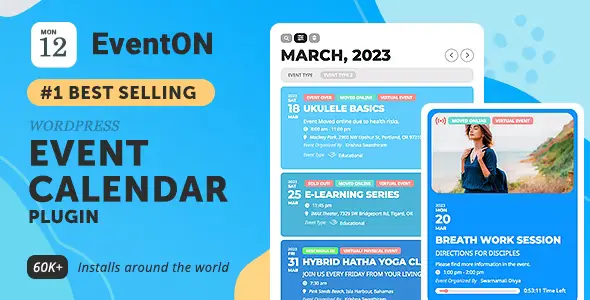
EventON – WordPress Virtual Event Calendar Plugin is a powerful WordPress event calendar plugin that lets you create, manage, and showcase unlimited events with a clean, modern design. Featuring support for recurring and multi-day events, virtual event integration, interactive maps, and advanced search filters, it delivers a professional and engaging way to organize both online and offline events.

EventON – WordPress Virtual Event Calendar Plugin

EventON is a beautifully designed, feature-rich event calendar plugin for WordPress that makes managing and showcasing events simple and engaging. With its minimal, clutter-free design and powerful customization options, EventON allows you to display events in a visually appealing way while providing all the essential details your audience needs. Whether you’re hosting workshops, conferences, or virtual events, EventON helps you organize and present them seamlessly.


🌟 Key Features of EventON

1. Event Management

  • Unlimited Events: Create and manage unlimited events with ease.
  • Repeating Events: Support for daily, weekly, monthly, and custom recurring schedules.
  • Virtual Events: Host and display online events with integrated links.
  • Multi-Day Events: Showcase events spanning multiple days or months.

2. Event Display & Customization

  • Minimal Design: Clean, modern layouts that highlight event details.
  • Custom Categories: Organize events with unlimited categories and tags.
  • Interactive Maps: Display event locations with Google Maps integration.
  • Color & Layout Options: Customize event cards, icons, and styles to match your brand.

3. User Engagement Tools

  • Search & Filter: Allow visitors to find events quickly by category, date, or keyword.
  • Organizer Details: Showcase event organizers with contact info and profiles.
  • Attendee Interaction: Provide RSVP options and attendee management.
  • Event Countdown: Add timers to build excitement for upcoming events.

4. Technical Features

  • Responsive Design: Optimized for mobile, tablet, and desktop.
  • Shortcode Generator: Easily embed calendars into posts and pages.
  • Add-ons Support: Extend functionality with premium add-ons (tickets, RSVP, etc.).
  • Cross-Browser Compatibility: Works smoothly across all major browsers.

📊 Quick Overview Table

Feature Benefit
Unlimited Events Manage any number of events
Repeating & Multi-Day Flexible scheduling options
Virtual Event Support Host online events seamlessly
Interactive Maps Display event locations clearly
Search & Filter Improve user experience and navigation
Shortcode Generator Easy embedding into WordPress pages

🌟 Why Choose EventON?

EventON – WordPress Virtual Event Calendar Plugin is the ultimate solution for event organizers, educators, and businesses who want a professional, customizable, and user-friendly event calendar. With its elegant design, powerful features, and support for both physical and virtual events, EventON makes it easy to engage your audience and manage events of any scale.

🛠️ How to Install GPL Themes & Plugins from GPLFox.com


1. Download Your Theme or Plugin

  • Visit GPLFox.com and log in to your account.
  • Browse or search for the theme/plugin you want.
  • Click Download to get the .zip file onto your computer.

2. Install via WordPress Dashboard

  • Log in to your WordPress Admin Panel.
  • Go to:
    • ThemesAppearance > Themes > Add New > Upload Theme
    • PluginsPlugins > Add New > Upload Plugin
  • Click Upload, then select the .zip file you downloaded from GPLFox.
  • Press Install Now.

3. Activate the Theme or Plugin

  • Once installed, click Activate.
  • For themes: your site will immediately switch to the new design.
  • For plugins: the plugin will be enabled and ready to configure.

4. Configure Settings

  • Most premium themes/plugins include customization options.
  • Navigate to the theme’s Customizer or plugin’s Settings panel.
  • Adjust layouts, features, and integrations as needed.

5. Keep Files Updated

  • GPLFox provides updated versions regularly.
  • Re‑download the latest .zip from GPLFox and repeat the upload process to update your theme/plugin.

Tip for Users: Since GPL products don’t require license activation, you can use them right away after installation. Just make sure to keep them up to date for security and compatibility.

Need Hosting Solution ?
0



