

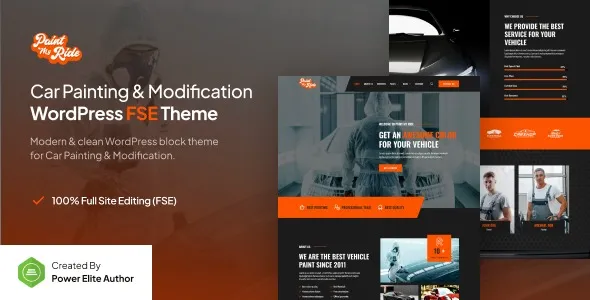

Description
The PaintMyRide Car Painting Modification Theme is a professional solution for automotive businesses. This car painting WordPress theme is ideal for workshops offering auto modification templates, vehicle detailing website themes, and car restoration WordPress themes. With its Elementor car service template, garages can showcase projects and attract new clients. Thanks to WooCommerce auto service theme integration, businesses can sell packages or products online, while its responsive design ensures a seamless browsing experience. For any automotive workshop design, PaintMyRide delivers a powerful SEO-ready presence with GPL Fox branding.
🎨 Theme Overview
- Name: PaintMyRide Car Painting Modification Theme
- Developer: Jegtheme
- Platforms: WordPress (FSE Gutenverse + Elementor Template Kit)
- Target Audience: Auto painting shops, car modification garages, detailing services, and restoration businesses.
- Design Style: Bold automotive visuals, modern typography, and service-focused layouts.
🚗 Key Features
- Full Site Editing (FSE): Built with Gutenverse block editor for drag-and-drop customization.
- Elementor Template Kit: Pre-built templates for service pages, portfolios, and contact sections.
- Responsive Design: Optimized for mobile, tablet, and desktop viewing.
- Service-Oriented Layouts: Dedicated sections for car painting, detailing, modification, and restoration.
- Portfolio Showcase: Highlight completed projects with galleries and before/after comparisons.
- Booking & Contact Forms: Integrated forms for customer inquiries and service scheduling.
- SEO-Friendly Structure: Clean code and optimized layouts for better search rankings.
- WooCommerce Ready: Supports online booking, product sales, or service packages.
- Documentation & Support: Well-documented with developer support available.
🛠️ Use Cases
- Car Painting Workshops: Showcase paint jobs, finishes, and custom designs.
- Modification Garages: Present tuning, body kits, and performance upgrades.
- Detailing Services: Highlight interior/exterior cleaning and polishing packages.
- Restoration Businesses: Display classic car restorations with detailed portfolios.
📊 Comparison Snapshot
| Feature | PaintMyRide Theme | Generic Auto Theme |
|---|---|---|
| Gutenverse FSE Support | ✅ Yes | ❌ Limited |
| Elementor Templates | ✅ Yes | ✅ Yes |
| Automotive Focus | 🎯 Specialized | ⚪ General |
| Portfolio Showcase | ✅ Advanced | ⚪ Basic |
| WooCommerce Support | ✅ Ready | ⚪ Optional |
⚠️ Considerations
- Niche Focus: Best suited for automotive businesses; less flexible for unrelated industries.
- Learning Curve: FSE + Elementor may require some WordPress familiarity.
- Hosting Needs: Works best with optimized WordPress hosting (e.g., LiteSpeed + caching).
✅ Recommendation
PaintMyRide is a modern, professional WordPress theme built for car painting, modification, detailing, and restoration businesses. It combines Gutenverse FSE block technology with Elementor compatibility, offering a sleek automotive design, responsive layouts, and easy customization for workshops, garages, and auto service providers.
If you’re running a car painting or modification business in Dhaka or globally, PaintMyRide offers a professional, SEO-ready solution with modern design and service-focused features. It’s especially valuable for workshops wanting to showcase portfolios, attract online bookings, and build credibility with a polished web presence.









Reviews
There are no reviews yet.