


Description
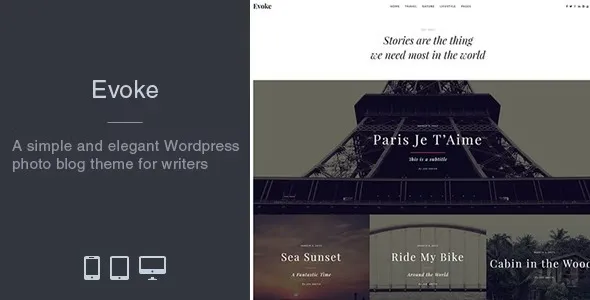
The Evoke Photo Stories Blog WordPress Theme at GPL Fox is designed for photographers, writers, and lifestyle bloggers who want to showcase their creativity online. This photo blog WordPress theme is perfect for building a photography storytelling theme or a lifestyle blog WordPress theme with immersive visuals. Travel enthusiasts can use it as a travel blog template, while authors benefit from its creative writing blog theme design. With a responsive photo journal WordPress layout and SEO-friendly blog theme structure, Evoke ensures your stories look stunning across all devices.
📖 Theme Overview
- Name: Evoke – Photo Stories Blog WordPress Theme
- Developer: MatchThemes
- Platform: WordPress (GPL Licensed)
- Audience: Photographers, travel bloggers, lifestyle writers, storytellers
- Design Style: Minimalist, content-focused, full-screen imagery
🚀 Key Features
- 10+ Layouts: Multiple homepage, blog, archive, and search page designs.
- Responsive Design: Optimized for desktop, tablet, and mobile.
- Full-Screen Images: Perfect for photo-heavy storytelling blogs.
- Typography & Colors: Unlimited customization with Google Fonts and color options.
- Header Styles: 4 header variations and 3 single post top layouts.
- Demo Import: 1-click demo installation with XML demo data included.
- SEO-Friendly: Clean coding and optimized for search engines.
- Customizer Support: Live preview editing for site title, logo, colors, and typography.
- Social Media Integration: Instagram feed in footer, social icons included.
- Plugins Compatibility: Contact Form 7, Gutenberg, and child theme support.
🛠️ Use Cases
- Photography Blogs: Showcase photo stories with immersive layouts.
- Travel Journals: Share travel experiences with full-screen visuals.
- Lifestyle Blogs: Elegant design for fashion, food, or personal storytelling.
- Creative Writers: Minimalist style for text-focused content with strong imagery.
📊 Comparison Snapshot
| Feature | Evoke Theme | Generic Blog Theme |
|---|---|---|
| Full-Screen Imagery | ✅ Yes | ⚪ Limited |
| Layout Options | ✅ 10+ | ⚪ Few |
| SEO Optimization | ✅ Strong | ⚪ Basic |
| Social Media Feed | ⚪ Optional | |
| Demo Import | ✅ 1-Click | ⚪ Manual |
⚠️ Considerations
- Best for Visual Blogs: Strong focus on photography and storytelling.
- GPL Version: Available at GPL Fox without developer support; for official support, buy directly from MatchThemes.
- Hosting Needs: Works best with optimized WordPress hosting for speed.
✅ Recommendation
Evoke – Photo Stories Blog WordPress Theme is a clean, modern blogging theme designed for photographers, storytellers, and creative writers. Available at GPL Fox, it offers multiple layouts, full-screen imagery, and responsive design, making it ideal for photo travel blogs, lifestyle journals, and personal storytelling websites.
If you want a photo-centric blog theme that highlights storytelling with immersive visuals, Evoke at GPL Fox is an excellent choice. It’s especially suited for photographers, travel bloggers, and lifestyle writers in Dhaka or globally who want a clean, modern, and SEO-ready design.










Reviews
There are no reviews yet.