

Description
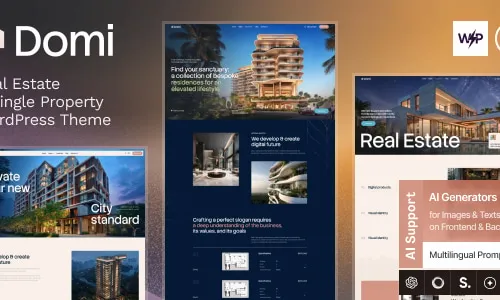
The Domi Real Estate WordPress Theme is a powerful theme designed for agencies, property managers, and realtors. This property listing agency WordPress template offers modern layouts for showcasing homes, apartments, and commercial properties with professional detail. Built with Elementor, the realtor WordPress theme allows drag‑and‑drop customization for property pages, galleries, and service sections.
WooCommerce integration ensures the housing marketplace theme for WordPress can handle secure payments, subscriptions, and property packages. Fully responsive and retina‑ready, the responsive real estate WordPress theme delivers a seamless experience across devices. As an SEO-optimized WordPress theme, Domi enhances online visibility and credibility. Whether you need a modern real estate agency WordPress theme or a property management WordPress theme, Domi provides the complete solution for professional growth.
🌐 Overview
- Purpose: Build real estate websites or single property landing pages.
- Audience: Realtors, property managers, developers, and agencies.
- Platform: WordPress theme with Elementor compatibility.
🔑 Key Features
- Single Property Showcase: Highlight individual homes or projects with dedicated layouts.
- Property Listings: Create detailed pages with images, descriptions, and pricing.
- Responsive Design: Optimized for desktop, tablet, and mobile.
- Drag‑and‑Drop Builder: Easy customization with Elementor.
- Pre‑Built Templates: Home, property details, agents, blog, and contact pages.
- Search & Filter Options: Help visitors find properties by type, location, or price.
- Agent Profiles: Display realtor information, contact details, and social links.
- WooCommerce Support: Sell property‑related services or booking packages.
- Global Styles: Consistent typography, colors, and branding.
- Blog Integration: Share real estate news, tips, and market insights.
- SEO‑Friendly: Clean coding and optimized structure for search visibility.
- Translation Ready: Multilingual support for international clients.
📊 Benefits
| Feature | Standard Theme | Domi Theme |
|---|---|---|
| Single Property Focus | Limited | Dedicated showcase layouts |
| Property Listings | Generic | Real estate‑specific templates |
| Agent Profiles | Basic | Built‑in realtor pages |
| Search & Filters | Minimal | Optimized for property browsing |
| WooCommerce Support | Optional | Integrated for services & bookings |
⚠️ Considerations
- Premium License: Required for updates and support.
- Content Replacement: Demo content must be customized with your own property details.
- Hosting Quality: Recommended for image‑heavy property showcases.
✅ Best For
- Real estate agencies showcase multiple listings.
- Property developers promoting single projects or apartments.
- Realtors building personal property portfolios.
- Agencies creating real estate websites for clients.
Domi Real Estate WordPress Theme delivers elegant, responsive, and property‑focused layouts with single property showcases, agent profiles, search filters, and WooCommerce integration—ideal for realtors and developers seeking a professional online presence.










Reviews
There are no reviews yet.