


Description
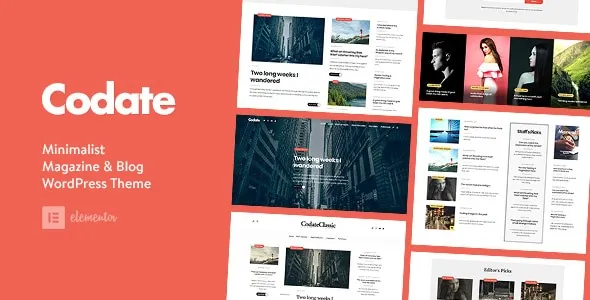
Codate Modern Magazine and Blog WordPress Theme is designed for publishers who want flexibility, speed, and style. As a modern magazine WordPress theme, it offers sleek layouts for lifestyle, fashion, and news websites. Bloggers can leverage it as a responsive blog WordPress template to share stories with an SEO‑friendly blog WordPress theme structure, while editors can build a news portal WordPress theme that delivers fast performance and engaging content.
Whether you’re running a lifestyle magazine WordPress theme, an online magazine WordPress theme, or a creative publishing WordPress template, Codate ensures your content stands out with professional design. It’s also ideal as a content creator WordPress theme or professional blogging WordPress template, giving you the tools to grow readership and improve search visibility.
🌟 Key Features of Codate
1. Magazine & Blog Essentials
- Multiple Homepage Layouts: Choose from modern designs tailored for magazines and blogs.
- Category & Tag Pages: Organize content for easy navigation and discovery.
- Featured Posts & Sliders: Highlight trending stories and top articles.
- Author Profiles: Showcase writers with bios, social links, and article lists.
2. Design & Customization Tools
- Clean & Modern Layouts: Professional designs optimized for readability.
- Drag-and-Drop Editing: Easy customization with WordPress blocks and page builder support.
- Prebuilt Templates: Ready-to-use homepage and inner page designs for blogs and magazines.
- Theme Options Panel: Adjust fonts, colors, and layouts to match your brand identity.
3. User Experience Enhancements
- Responsive & Retina Ready: Optimized for flawless performance across mobile, tablet, and desktop.
- SEO-Friendly Structure: Built-in optimization for better search engine visibility.
- Fast Loading Speeds: Lightweight design ensures smooth browsing and higher engagement.
- Cross-Browser Compatibility: Works seamlessly across all major browsers.
4. Extra Functionalities
- One-Click Demo Import: Quickly set up your site with sample content.
- Ad Management Support: Monetize your magazine with banner and ad placements.
- Social Media Integration: Connect your publication with audiences across platforms.
- Newsletter & Subscription Options: Grow your readership with email sign-ups.
📊 Quick Overview Table
| Feature | Benefit |
|---|---|
| Multiple Layouts | Tailored designs for blogs & magazines |
| Featured Posts & Sliders | Highlight trending stories |
| Author Profiles | Showcase writers and build credibility |
| Responsive Design | Works perfectly on all devices |
| SEO-Friendly | Better visibility on Google |
| Ad Management | Monetize your magazine easily |
| One-Click Demo Import | Instant setup with sample content |
🌟 Why Choose Codate?
Codate is more than just a WordPress theme—it’s a complete publishing solution for modern magazines and blogs. With its sleek layouts, content-focused features, and monetization options, it empowers publishers to build a professional online presence. Whether you’re a solo blogger, editorial team, or digital magazine, Codate delivers the flexibility, speed, and design excellence you need to captivate readers and grow your brand.










Reviews
There are no reviews yet.