

Download All Products Free With Any Membership Plan

Latest Version

BWL Advanced FAQ Manager Plugin For WordPress

Buy This Single Latest Version From Here

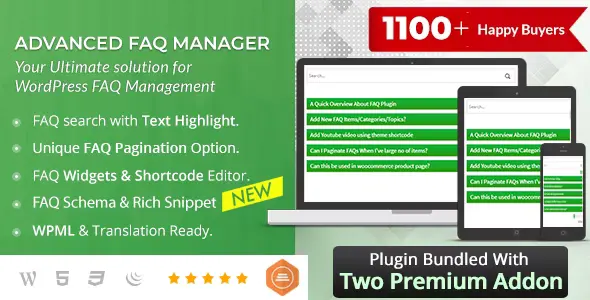
BWL Advanced FAQ Manager Plugin For WordPress: A premium plugin that helps you create, organize, and display professional FAQ sections with ease. It supports unlimited FAQs and categories, live search with suggestions, rating systems, and multiple pre‑built themes. With shortcode and widget support, animated accordion layouts, and full responsiveness, it’s perfect for businesses, e‑commerce sites, and agencies looking to improve customer support and user experience. This plugin transforms static FAQ pages into interactive, searchable knowledge hubs that engage users and reduce support requests.

Description

BWL Advanced FAQ Manager Plugin For WordPress is a powerful plugin designed to help you quickly and efficiently build, organize, and display professional FAQ sections. It offers unlimited FAQ posts and categories, live search with suggestions, rating systems, and multiple themes, making it ideal for businesses, agencies, and content-heavy websites that need structured, user-friendly FAQ pages.


🌐 Overview

  • Purpose: Create and manage advanced FAQ sections in WordPress.
  • Audience: Businesses, e‑commerce sites, agencies, educators, and bloggers.
  • Integration: Works seamlessly with WordPress, Gutenberg, and classic editors.

🔑 Key Features

  • Unlimited FAQ Posts & Categories: Organize FAQs into topics for easy navigation.
  • Live Search System: Users can instantly find answers with highlighted results and suggestions.
  • FAQ Rating System: Collect feedback by allowing users to vote on the usefulness of FAQs.
  • Pagination Support: Display hundreds of FAQs in a compact, organized layout.
  • 7 Pre‑built Themes: Choose from multiple FAQ styles to match your site’s branding.
  • Shortcode Generator: Insert FAQs anywhere (pages, posts, widgets) with ease.
  • Widgets & Gutenberg Support: Compatible with modern WordPress editors.
  • Animated Accordion Layouts: Enhance user experience with collapsible FAQ sections.
  • Mobile Friendly & Responsive: Optimized for all devices.
  • Localization Ready: Translate FAQs into multiple languages.
  • Developer Friendly: Extend functionality with hooks and custom styling.

⚙️ How It Works

  1. Install & Activate: Add the plugin to your WordPress site.
  2. Create FAQ Posts: Add questions and answers, then categorize them.
  3. Insert FAQs: Use shortcodes or widgets to display FAQs anywhere.
  4. Customize Layout: Choose themes, enable search, and configure rating options.
  5. Publish: Visitors can easily browse, search, and interact with FAQs.

📊 Comparison Table

Feature Default WordPress FAQ (manual setup) BWL Advanced FAQ Manager
Unlimited FAQs Limited Yes
Live Search No Yes
FAQ Rating No Yes
Themes & Styling Manual CSS 7 built‑in themes
Shortcode Support Limited Full integration

⚠️ Considerations

  • Learning Curve: While easy to set up, advanced features may require configuration.
  • Performance: Large FAQ databases should use pagination to maintain speed.
  • Compatibility: Ensure your WordPress theme supports shortcodes and widgets.

✅ Best For

  • E‑commerce sites need FAQs on products or shipping.
  • Businesses offering customer support resources.
  • Agencies & developers building client sites with structured FAQ sections.
  • Educational platforms provide quick answers to common student queries.

In short, BWL Advanced FAQ Manager for WordPress is a feature‑rich plugin that transforms static FAQ pages into interactive, searchable, and user‑friendly knowledge hubs—perfect for improving customer support and user experience.


Reviews

There are no reviews yet.

Only logged in customers who have purchased this product may leave a review.

🛠️ How to Install GPL Themes & Plugins from GPLFox.com

1. Download Your Theme or Plugin

  • Visit GPLFox.com and log in to your account.
  • Browse or search for the theme/plugin you want.
  • Click Download to get the .zip file onto your computer.

2. Install via WordPress Dashboard

  • Log in to your WordPress Admin Panel.
  • Go to:
    • ThemesAppearance > Themes > Add New > Upload Theme
    • PluginsPlugins > Add New > Upload Plugin
  • Click Upload, then select the .zip file you downloaded from GPLFox.
  • Press Install Now.

3. Activate the Theme or Plugin

  • Once installed, click Activate.
  • For themes: your site will immediately switch to the new design.
  • For plugins: the plugin will be enabled and ready to configure.

4. Configure Settings

  • Most premium themes/plugins include customization options.
  • Navigate to the theme’s Customizer or plugin’s Settings panel.
  • Adjust layouts, features, and integrations as needed.

5. Keep Files Updated

  • GPLFox provides updated versions regularly.
  • Re‑download the latest .zip from GPLFox and repeat the upload process to update your theme/plugin.

Tip for Users: Since GPL products don’t require license activation, you can use them right away after installation. Just make sure to keep them up to date for security and compatibility.

Need Hosting Solution ?
Select your currency
Shopping cart13
Ohio – Creative Portfolio & Agency WordPress Theme
Ohio – Creative Portfolio & Agency WordPress ThemeUSD2.99
WooCommerce-Currency
WooCommerce Currency Switcher – Multi Currency and Multi PayUSD2.99
CoffeeBean-Easy-Simple-Portfolio-for-Freelancers-Studios-and-Photographers
CoffeeBean – Easy & Simple Portfolio for Freelancers, Studios and PhotographersUSD2.99
TypeSense Search for WooCommerce
TypeSense Search for WooCommerceUSD2.99
Synck Business & IT Solutions
Synck Business & IT SolutionsUSD2.99
Drake – Personal Portfolio Resume Theme
Drake – Personal Portfolio Resume ThemeUSD2.99
Norebro – Creative Portfolio Theme for Multipurpose Usage
Norebro – Creative Portfolio Theme for Multipurpose UsageUSD2.99
Thallo – Consulting & Finance WordPress Theme
Thallo – Consulting & Finance WordPress ThemeUSD2.99
STAG – Personal Portfolio WordPress Theme
STAG – Personal Portfolio WordPress ThemeUSD2.99
Multi Currency Pro for WooCommerce
Multi Currency Pro for WooCommerceUSD2.99
Evne – Creative Portfolio WordPress Theme
Evne – Creative Portfolio WordPress ThemeUSD2.99
Katerina – Photography & Portfolio WordPress Theme
Katerina – Photography & Portfolio WordPress ThemeUSD2.99
Total
USD38.87
Continue shopping
13







